
PushScroll vs FitScroll: which exercise-to-unlock app is right for you?
· 6 min read
If you have ever searched for an app that makes you do push-ups before it lets you open TikTok, you already know the shelf is crowded. PushScroll, Repscroll, RepLock, Kinetic and a handful of others all sell the same one-line promise: move your body, earn your screen time. They also all sit on top of the same foundation — Apple's Screen Time API, which is the only sanctioned way an iPhone app can block another app.
So the interesting question is not whether they block apps. They all do. The question is what an app asks of you before it hands your phone back, and how that fits the way you actually live. This is an honest comparison between PushScroll and FitScroll, written by the team behind FitScroll — including the parts where PushScroll is the better choice.
Same idea, two very different economies
PushScroll runs on a direct exchange rate: one push-up buys one minute, and you spend it more or less on the spot. It is beautifully simple, and that simplicity is exactly why the concept went viral in the first place. The catch is that it ties every unlock to a workout you do right now, in the moment you want your phone.
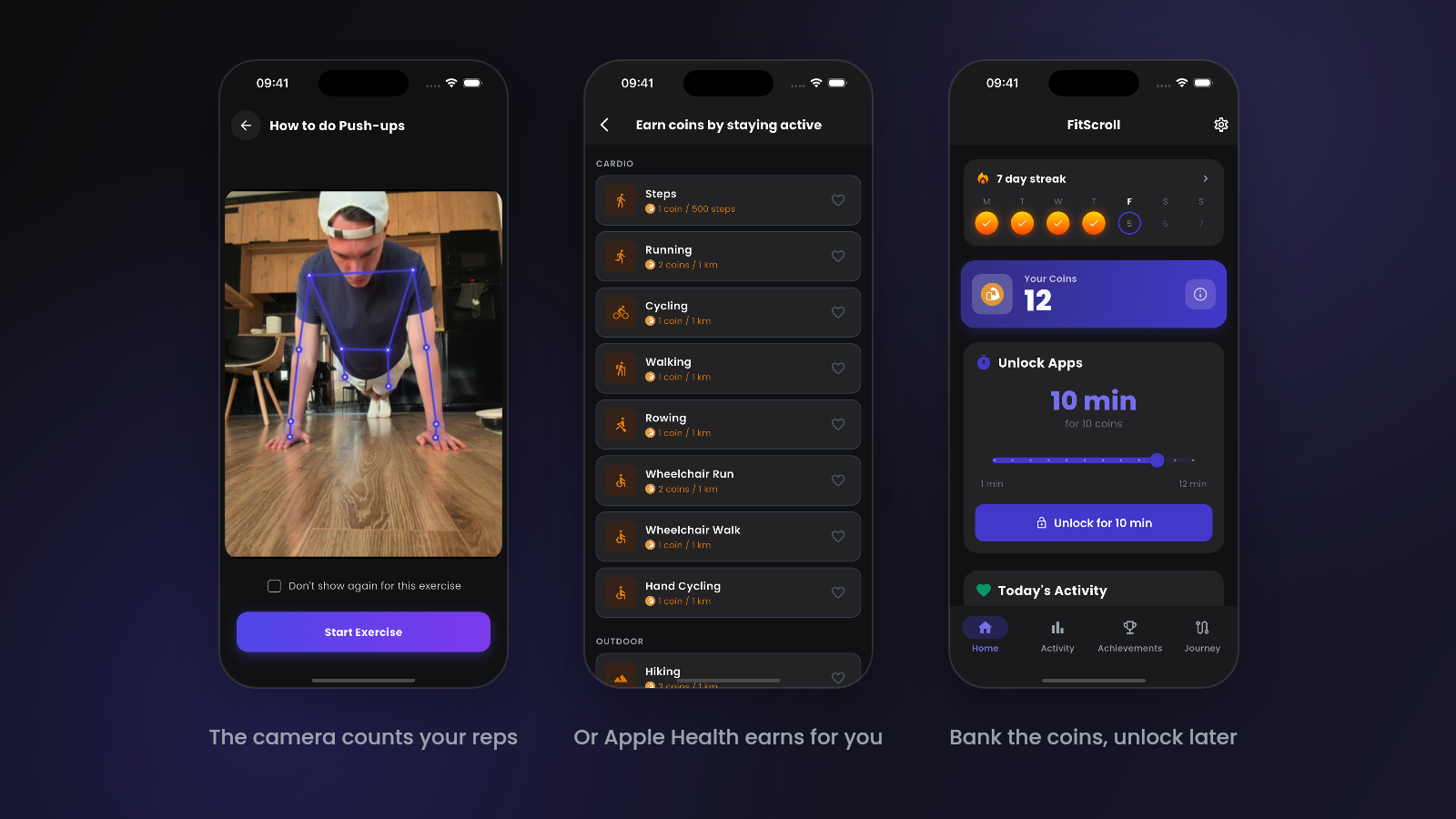
FitScroll puts a currency in between. Exercise earns coins, coins go into a balance, and you decide later how many to spend and for how long. Lock your apps again before the timer runs out and the unused coins come back to your balance instead of evaporating.
That sounds like a small design detail, and for a lot of people it is. But it changes who the app works for. If you train in the morning, you can bank an hour of screen time before breakfast and stop negotiating with yourself for the rest of the day. If you are standing in a queue and want two minutes of Instagram, you are not choosing between doing burpees in public and going without.
What actually counts as exercise
Both apps use your camera and on-device pose detection to count reps, so neither one lets you fake it by waving your phone around. The exercise lists overlap heavily: push-ups, squats, sit-ups, jumping jacks, lunges and a few harder variants.
The bigger difference is what happens when you are not in the mood to get on the floor. FitScroll treats Apple Health as a first-class source of coins, so daily steps, runs, bike rides and swims all earn on their own without you opening the app at all. Walk to work and you have already paid for your commute scroll.
This matters more than it sounds. An app that only accepts push-ups is an app for people who can do push-ups. Anyone recovering from an injury, anyone whose fitness base is a daily walk rather than a floor workout, and anyone who simply does not want to drop and press in an office will eventually hit a wall and delete it.
Side by side
| PushScroll | FitScroll | |
|---|---|---|
| Platforms | iOS and Android | iOS only |
| Unlock model | Reps convert straight into minutes | Reps earn coins you bank and spend later |
| Unused time | Spent once the timer starts | Refunded to your balance if you lock early |
| Apple Health | Steps | Steps, running, cycling, swimming and other workouts |
| Free tier | Hard paywall — roughly $30 a year at the time of writing | Free core features, optional Pro subscription |
| App languages | English | 9 languages |
| Progression | Journey tab, streaks, guided workout library | 500-milestone journey, 70+ achievements, streaks |
When PushScroll is the better choice
- You are on Android. FitScroll is iOS-only today, so this one decides it outright.
- You want a guided workout library. PushScroll leans further into being a fitness app, with structured bodyweight, strength and stretching sessions on top of the unlock mechanic.
- You want the bigger crowd. It has a large user base and community challenges, which is genuinely motivating if that is how your brain works.
- You want the strictest possible rule. A rigid one-rep-one-minute exchange with no banking is harder to rationalise your way around, and some people need exactly that.
When FitScroll is the better choice
- Your movement is not just push-ups. Walking, running, cycling and swimming all earn coins automatically through Apple Health.
- You train in blocks. One gym session can fund several days of screen time instead of forcing a workout every time you reach for your phone.
- You want to try before you pay. The core loop — block apps, exercise, unlock — is free.
- You do not read in English. FitScroll is fully translated into nine languages, which is unusual in this category.
So which one should you install?
If you are on Android, the decision is made for you. If you are on iPhone and you want the most uncompromising version of the idea — do the reps, get the minutes, no accounting — PushScroll delivers that and has the community to back it up.
If you would rather have a system that survives contact with a real week, including the days you walk instead of train and the mornings you want to get your screen time out of the way, the coin model is the more forgiving design. Both apps are cheap enough that trying the free tier of one for a week costs you nothing but a few hundred reps.
Whichever you pick, the mechanic itself works. Putting even thirty seconds of physical effort between you and an infinite feed breaks the reflex, and breaking the reflex is most of the battle.